
Blog
How to Overcome Local (On-Premises) LLM Performance Problems
Diagnose local LLM latency, throughput, and memory constraints before choosing quantization, batching, or an inference runtime.

Why Local LLMs Struggle With Performance
Deploying large language models (LLMs) on-premises—within your own servers or private cloud—has become an increasingly popular approach for organizations prioritizing:
Data security & compliance
Full control over infrastructure
Customization of model behavior
However, this control comes at a price:
performance bottlenecks.
Common challenges include:
High inference latency: Slow response times due to limited hardware resources compared to hyperscale cloud infrastructure.
Low throughput: Difficulty processing concurrent requests without delays.
Resource exhaustion: Memory and GPU/CPU bottlenecks on finite on-prem hardware.
Complex scaling: Adding more capacity isn’t always automatic or cost-efficient.
Fortunately, there are proven strategies and frameworks to overcome these issues without sacrificing your control and privacy.
Key Strategies to Improve On-Prem LLM Performance
Below are three approaches you can combine to achieve production-grade performance:
Choose Lightweight and Optimized Frameworks
Framework selection matters.
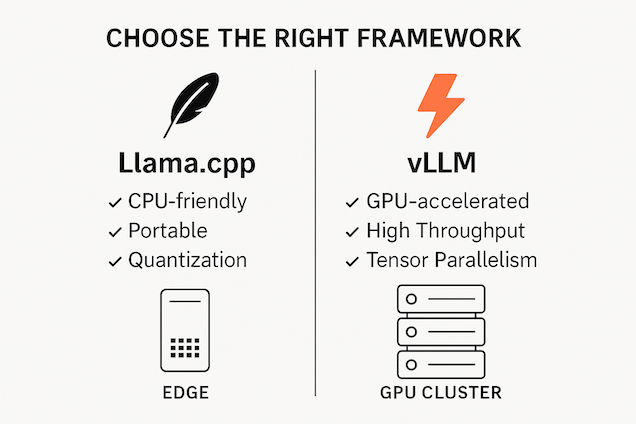
Two of the most widely adopted solutions for efficient on-prem inference are:
✅ Llama.cpp
Portable, written in C++, works well even on CPUs.
Minimal dependencies—good for edge and constrained environments.
Supports quantized models (smaller memory footprint).
✅ vLLM
Built for GPU acceleration and fast token generation.
Implements PagedAttention and Tensor Parallelism for higher throughput.
Easier to scale across multiple GPUs.
When to use which?
Llama.cpp: If your infrastructure is CPU-heavy or you need maximum portability.
vLLM: If you have modern GPUs and need maximum speed.
Optimize Inference Batching and Parallelism
Even with a fast framework, inference can choke without batching and concurrency tuning.
Dynamic Batching:
Collects multiple inference requests and processes them as a single batch.
Reduces overhead per request.
Increases GPU utilization.
Configurable via parameters like:
Max batch delay (ms): how long to wait for more requests.
Batch size target/limit: how many requests to group together.
Tensor Parallelism:
Especially useful with vLLM.
Splits computation across multiple GPUs.
Yields faster token generation and higher throughput.
Tip: Monitor how batch sizes and delays impact latency. For user-facing applications, smaller batch delays may be preferable.
Implement Autoscaling Policies
Unlike managed services, on-prem deployments need custom scaling logic.
Autoscaling Concepts:
Scale-up triggers: E.g., when request queues exceed thresholds.
Scale-down triggers: Releasing resources when traffic drops.
Replica autoscaling: Adjusts the number of model server instances dynamically.
Example Configuration (conceptual):
| Metric | Scale-Up Action | Scale-Down Action |
|---|---|---|
| Queue depth > 10 reqs | Start 1 more replica | — |
| GPU utilization > 80% | Add 1 GPU-enabled container | — |
| Queue depth < 2 reqs | — | Stop 1 replica |
Benefits:
Sustained low latency under load.
No manual intervention to provision resources.
Optimized cost efficiency.
Example: Deploying a Custom LLM with vLLM
Here is a simplified example workflow to get you started:
# Install vLLM
!pip install vllm
Load the model
from vllm import LLM
llm = LLM(model=“TheBloke/Llama-3-8B-Instruct-GPTQ”)
Generate text
prompt = “Explain the benefits of local LLMs.”
output = llm.generate(prompt, max_tokens=200)
print(output)
🔧 Tip: Use quantized models like GPTQ for smaller memory requirements.
Best Practices Checklist
Before you go live, review this list:
✅ Benchmark latency and throughput on your target hardware.
✅ Quantize or prune your models to reduce resource usage.
✅ Implement dynamic batching with conservative latency thresholds.
✅ Set autoscaling triggers based on real workload patterns.
✅ Log all inference times and resource utilization for continuous tuning.
Further Resources
Ready to Take Control?
Building performant on-premises LLM services requires careful design, modern frameworks, and continuous optimization. When done right, you can enjoy the best of both worlds:
🔐 Full control and privacy
⚡ Production-grade performance
If you’d like help assessing your infrastructure readiness or designing an optimized on-prem LLM stack, contact our AI consulting team to get started.
SysArt AI
Continue in this AI topic
Use these links to move from the article into the commercial pages and topic archive that support the same decision area.